

In 2026, Google and Google DeepMind are moving away from the old model of “copy text into an AI chat” and toward promptless interaction with AI. Instead of copying fragments, opening a separate window, and manually writing a request, the user can now simply point with a mouse or a finger on the screen, and the system understands what is needed. At the center of this shift are Magic Pointer on Gemini, integration in Google Chrome, the new Googlebook laptop category, and Gemini Intelligence on Samsung Galaxy and Google Pixel devices.
This article is a practical explanation of how Google is changing the way people interact with AI, what Magic Pointer is designed to do, how it works in Chrome and Googlebook, and how Android devices will get a built-in AI layer without the traditional chat-first workflow.
Magic Pointer from Google DeepMind
Magic Pointer is a concept for an AI cursor based on Gemini that “understands” what the user is pointing at and why it matters, without requiring prompts. Unlike a traditional AI tool where you must copy text into a separate chat window and explain what you want, Magic Pointer works inside the interface itself and reads intent through gestures and screen context.
How it works in practice
- the user points Magic Pointer at a block of text on a page;
- the system analyzes the content and identifies headings, paragraphs, lists, tables, and links;
- after a special modifier key, click, or touch gesture, a list of actions appears:
- “summarize this text,”
- “rewrite it,”
- “translate it,”
- “compare it with another element,”
- “turn it into a table or chart.”
The user does not type a prompt. They simply choose an action, and Gemini handles the rest in the background using the visual and semantic context of the current screen.
Four principles of promptless AI interaction
Google DeepMind describes four core principles behind Magic Pointer and the broader model of promptless interaction with AI.
1. Preserve workflow
The first principle is to avoid breaking the user’s workflow:
- AI should help directly inside the task;
- the user should not need to switch between apps or windows all the time.
For example, if you are editing a report in Google Docs and highlight a paragraph that needs a short summary, Magic Pointer can offer “summarize this text” directly in the document interface. This reduces cognitive load and speeds up routine work such as analysis, editing, comparison, and structuring.
2. Use visual and semantic context
The second principle is that AI should see the screen as structured content, not just as an image:
- Magic Pointer analyzes visual boundaries such as cards, tables, blocks, and buttons;
- it also reads semantic context such as headings, lists, tags, and overall structure;
- based on that, it suggests meaningful actions.
For instance, on a shopping page with multiple product cards, Magic Pointer can identify the layout and suggest actions like:
- “compare these products,”
- “show the cheaper option,”
- “list the key differences.”
Again, there is no prompt typing required.
3. Replace text prompts with natural gestures
The third principle is to use gestures and cursor movement as the language for AI:
- Gemini translates familiar user actions into semantic instructions;
- highlighting text, moving the cursor, tapping, or using touch gestures becomes a signal for actions like “compare,” “summarize,” “explain,” or “convert to a table.”
On a laptop:
- select text + press a modifier key → a menu appears with actions.
On a smartphone:
- tap and hold on a block of text → Gemini suggestions appear;
- swipe or tap → translate, shorten, or summarize.
This is the practical realization of promptless interaction with AI.
4. Pixels as interaction points
The fourth principle is that every interface element becomes an object AI can work with:
- Magic Pointer recognizes buttons, text, images, tables, and video previews;
- then it turns them into interactive objects for Gemini.
If you point at a screenshot of a site mockup, Magic Pointer can identify it as a design mockup and offer actions such as:
- compare it with the current design,
- suggest improvements,
- generate example HTML,
- produce a short summary.
In this model, the screen itself becomes an active layer for AI interaction, not just a visual surface.
Magic Pointer in Google Chrome
Google DeepMind is already integrating Magic Pointer ideas into Google Chrome, turning the browser into a place where users can interact with AI without prompts through visual context.
Real use cases in Chrome
1. Comparing products on a catalog page
- you open a product page;
- point Magic Pointer at one product, then another;
- the system suggests:
- “compare these products,”
- “show the best value for money,”
- “build a difference table.”
There is no copying and pasting into a separate AI window.
2. Reading and analyzing text or tables
- highlight a long paragraph or a table;
- Magic Pointer offers:
- “summarize,”
- “rewrite,”
- “extract key points,”
- “find anomalies,”
- “compare values.”
This is useful for analysts, developers, marketers, and freelancers who want to avoid moving data into a separate chat service.
3. Working with designs and mockups
If you are viewing a design mockup or presentation:

- Magic Pointer can recognize the elements,
- suggest UX improvements,
- compare versions,
- create a short description,
- or generate a simple code structure.
This shortens the path from visual analysis to AI help.
Googlebook: laptops built around Gemini
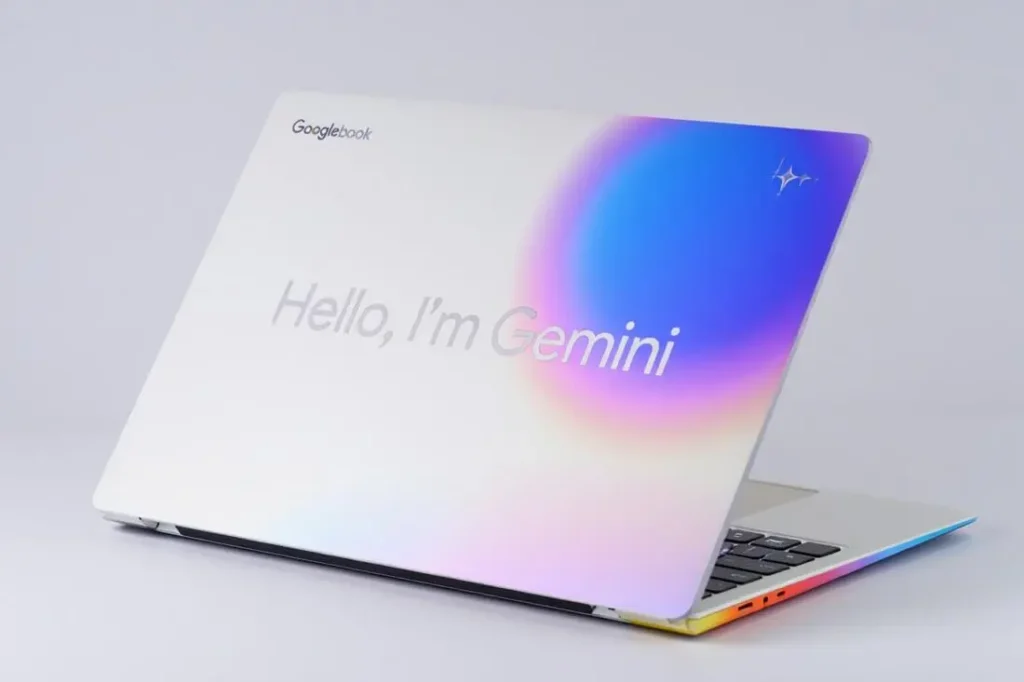
Googlebook is a new laptop category based on Gemini and the Android + ChromeOS stack, where AI is built into the interface rather than added as a separate app. In Googlebook, Magic Pointer becomes the main way to communicate with Gemini without prompts.
What Googlebook offers
1. AI widgets created by voice
The user can say:
- “create a widget for my daily tasks,”
- “create a currency tracker widget,”
- “create a widget for monitoring my inbox.”
Gemini then uses Google Tasks, Gmail, and Calendar data to generate a useful widget that works inside the device.
2. Gmail and Calendar integration
If you point at an email in Gmail, Magic Pointer can offer:
- “summarize this email,”
- “draft a reply,”
- “extract action items,”
- “link it to a task.”
For Calendar events, it can:
- summarize a meeting,
- suggest the next meeting time,
- highlight conflicts.
This makes promptless AI interaction part of everyday email and scheduling work.
3. Quick Access for file sharing
Googlebook includes Quick Access for fast file sharing between phone and laptop. Magic Pointer can help by suggesting:
- “open this file in Google Docs,”
- “summarize this document,”
- “turn this into a table.”
The phone and laptop effectively become one connected work space.
Gemini Intelligence on Samsung Galaxy and Google Pixel
In summer 2026, Google is launching Gemini Intelligence, a built-in AI layer for Android devices such as Samsung Galaxy and Google Pixel. This is not a separate app. It is an integrated AI experience that supports natural interaction without prompts.
Main features
1. Food and taxi ordering
The user can say:
- “order dinner for me,”
- “call a taxi to the airport.”
Gemini analyzes preferences, order history, hours of operation, and service options, then fills in the forms and completes the order through the selected app or service.
2. Cross-page content analysis
If multiple tabs or apps are open, the user can ask:
- “compare these three services by price.”
Gemini collects the data, creates a table, and produces a conclusion.
This is useful for pricing comparisons, news analysis, and multi-document reporting.
3. Removing filler words from speech transcripts
Gemini Intelligence can process audio recordings and remove filler words such as:
- “um,”
- “you know,”
- “like,”
- “well.”
The result is a cleaner, more readable transcript, which is useful for podcasts, lectures, meetings, and presentations.
What changes for users
Google’s direction in 2026 is clear: AI is moving from a chat window to a built-in interface layer.
That means:
- AI becomes part of the UI, not a separate tab;
- users interact through gestures, taps, cursor movement, and voice instead of prompts;
- the system reads screen context and user intent directly.
This makes AI feel more natural, faster, and less mentally expensive. Users no longer need to formulate a prompt for every task. They simply point at an object and choose an action.
Conclusion
Promptless interaction with AI is not just a slogan. It is Google’s real product direction in 2026. Magic Pointer, Gemini, Googlebook, and Gemini Intelligence on Samsung Galaxy and Google Pixel all point to the same future: AI will work through the interface itself, not through a separate chat box.
Users are moving from writing prompts to using screens, gestures, and voice as the main control layer. That shift has a strong chance of becoming the new standard across major ecosystems such as Android, ChromeOS, Windows, and iOS.
Publication author


